
Case Study 3: End-To End Application
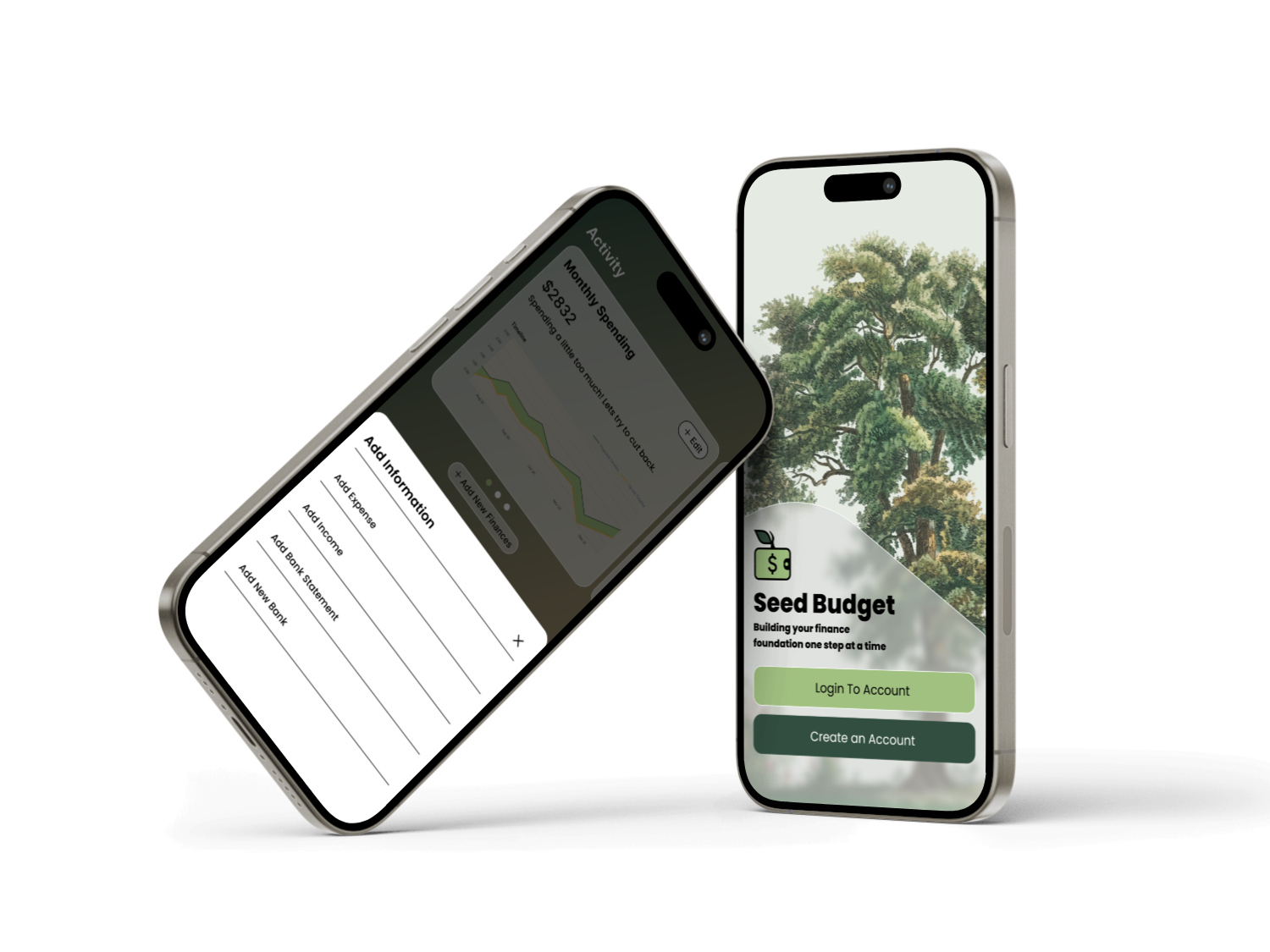
Seed Budget
Building your Foundation to Succeed
Overview:
By brother who is going is in college explained to me that there are times that he has difficulty figuring out how to spend money and track expenses that he has in day to day life.
This project was meant to:
Allow users to add income and expenses and give feedback on certain financial decisions
Use AI to help chat about plans for future finances or big purchases upcoming and how to maximize savings.
Role:
UI/UX Designer
Duration:
6 Weeks | October - December 2025 |
Capstone Project
Process:
User Research and synthesis, Solutioning, Prototyping, Usability Testing
Problem:
According to the CNBC 61% of young adults report being financially stressed and struggle to figure out how to save and what funds to have in case of emergencies. As someone who also struggles and now brother who is learning how to manage I wondered how apps can improve this problem that is occuring.
New users to budgeting need help to get started on budgeting and finances. How might we make financing easy to use for individuals?
Solution:
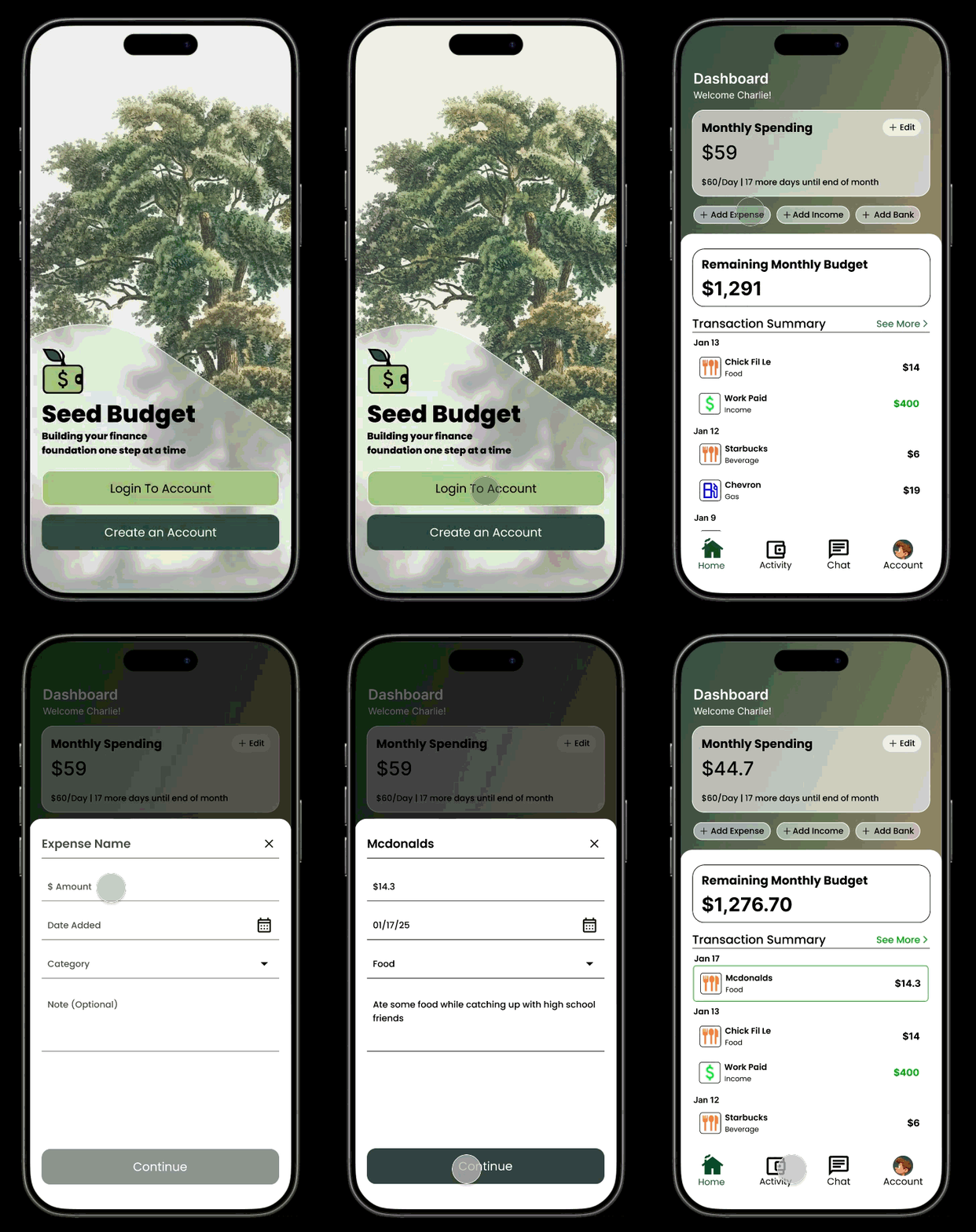
Seed Budget is designed to help you keep track of your daily tracking and spending habits, alerting you to overspending or progresses that are being made.
Seed budget also allows for chatting with built in AI, which can give information and suggestion plans based on the transaction and saving history linked to bank accounts.
Emphathize - Design Process
Initial Research
Competitive Analysis
I conducted research to get a feel for what other restaurants are doing with their home page.
Pokeworks and Poke House are popular Poke competitors in the area. Mountain Mikes is a neighboring restaurant and wanted to see if they are doing anything different. Doordash for the base of online order interaction and wanted to research them as well.
Aspects of competitor websites that stood out:
Sharing story, especially for these small chains have helped to bring branding as well as show the people who are the ones behind the kitchen.
Giving vibrant and a unique view of the restaurant helps to show and explain a lot about who the restaurants are as a whole.
User Interviews:
sdfasdfasdf

1
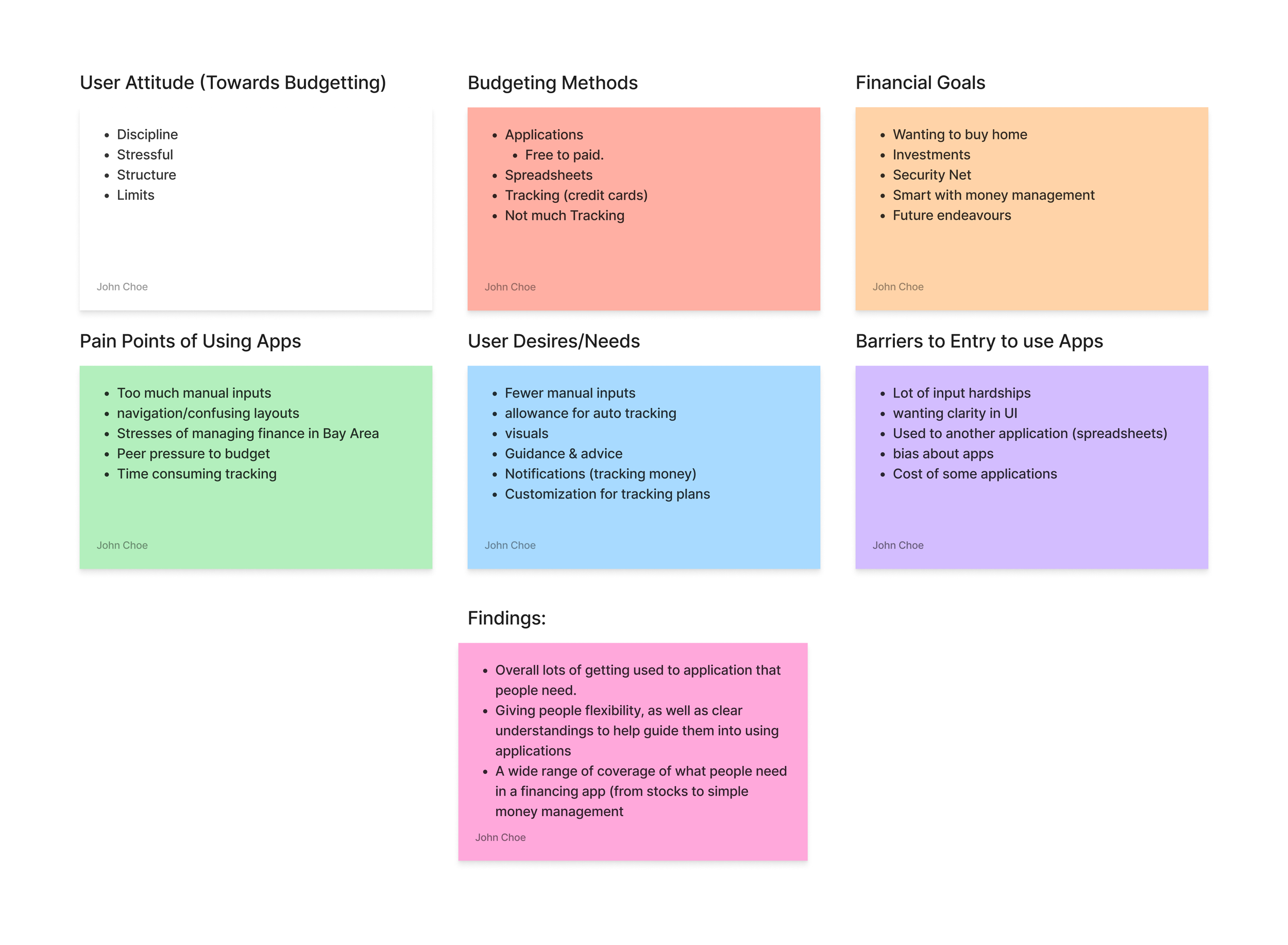
I conducted interviews with 5 users who have a wide variety of ordering out from restaurants/online websites. I focused on people who were in their 20-30 age group range. With having a wide variety of participants who eat and do not eat out often, this helped to share with me what first time users have problems with, while what drives away users who use apps often
Things that I have found through my initial research:
Users like clear and quick access to menu and items.
Ease of access to functions like going back to change menu or to navigate between pages.
Clear visuals of food for restaurants that they are visiting for the first time. Allows users to see what food are available and to make a better decision on what to eat because of that.
Emphathize - Design Process
Key Findings
I conducted interviews with 5 users who have a wide variety of ordering out from restaurants/online websites. I focused on people who were in their 20-30 age group range. With having a wide variety of participants who eat and do not eat out often, this helped to share with me what first time users have problems with, while what drives away users who use apps often
Things that I have found through my initial research:
Users like clear and quick access to menu and items.
Ease of access to functions like going back to change menu or to navigate between pages.
Clear visuals of food for restaurants that they are visiting for the first time. Allows users to see what food are available and to make a better decision on what to eat because of that.
I conducted interviews with 5 users who have a wide variety of ordering out from restaurants/online websites. I focused on people who were in their 20-30 age group range. With having a wide variety of participants who eat and do not eat out often, this helped to share with me what first time users have problems with, while what drives away users who use apps often
Things that I have found through my initial research:
Users like clear and quick access to menu and items.
Ease of access to functions like going back to change menu or to navigate between pages.
Clear visuals of food for restaurants that they are visiting for the first time. Allows users to see what food are available and to make a better decision on what to eat because of that.
Emphathize - Design Process
Through the initial User Interviews I found that many users want the experience of ordering food online to be an easy and simple process. As well, allowing to find clear understanding of what they are buying, and descriptions to help make their choice.
Nathan Luthor was a persona that I made that tried to emphasize those points. This helped me to focus my project into making sure:
Visuals are clear to users
Food and colors of the website help to enhance the experience of the users.
After creating the persona I made a user flow of what would need to be made for the pages and functions for the users. There were 2 aspects that needed to be tackled:
Page for menu and other foods that they offer
Sign Up for points and account creation

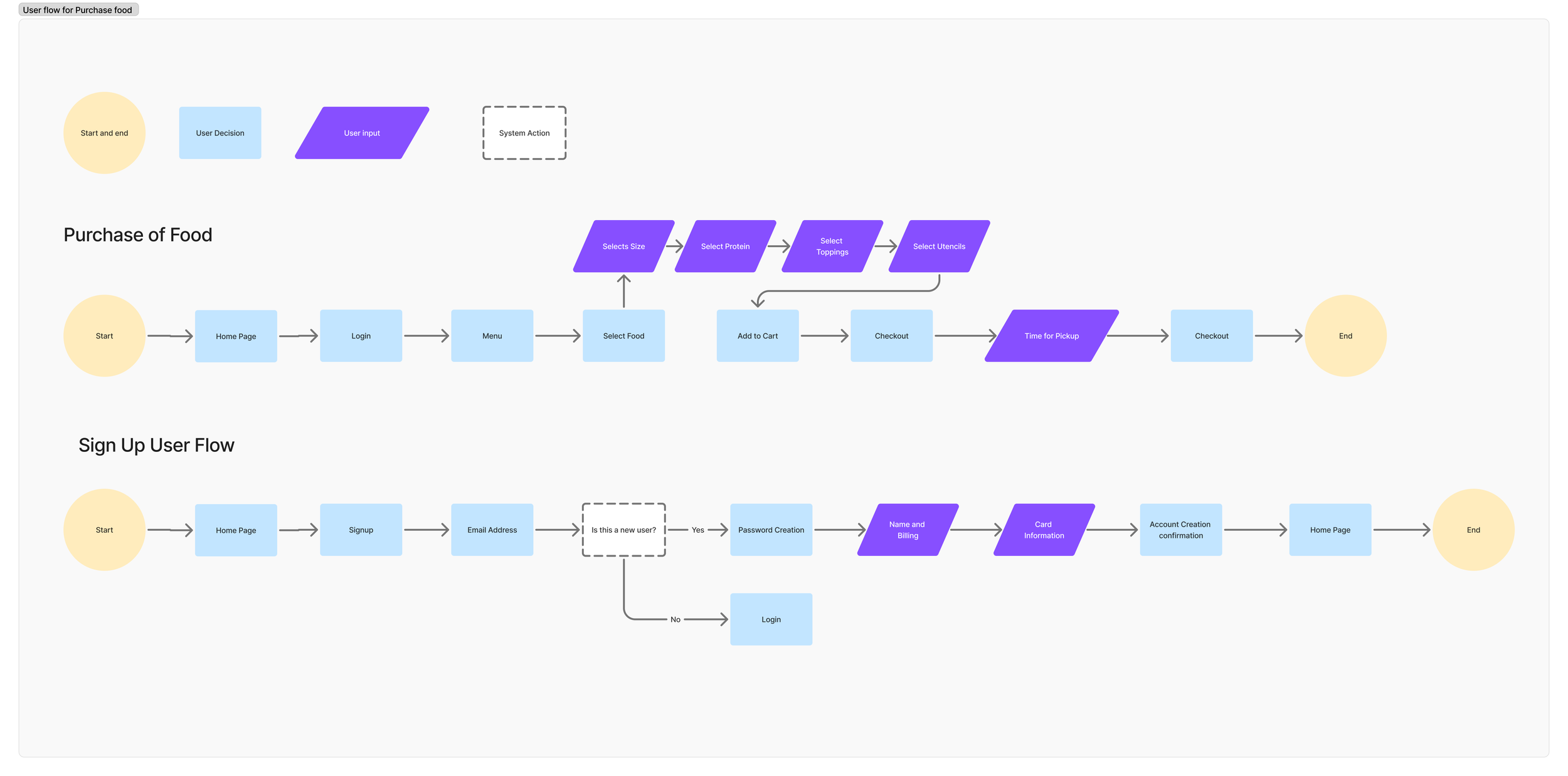
[Editor Note] - After browsing the PokiRun website, I found that PokiRun runs their actual purchases on a 3rd party website. This eliminated the need for a sign up flow, which was discovered later.
Defining Persona
Ideate - Wireframes
Design
Low Fidelity Wireframes:
After researching some designs, I found some common trends that many restaurants use that I wanted to implement:
Simple big initial screen that shares the restaurant name along with a clear ‘order now.’ I found this allows users to order quickly (for those who know what they are going to order) while allowing other users to scroll down and see the menu right away.
Dropdowns of images. Many obscure or items that do not need to be shown to everyone were made into dropdowns which I thought was a great way to keep pages clean but allows users information.
Mid Fidelity Wireframes:
I started to implement the above mentioned discoveries through my mid fidelity wireframes.


Low/Mid Fidelity Wireframe User Testings:
I tested some of these initial ideas with 3 users who all participated in my initial research interviews. For the testing I wanted to see if users can understand the layout of the website along with when looking at the menu, find how to create a bowl along with what goes into each customizable bowl.
My findings were:
Users found that the menu ‘pick your bowl’ area was too cluttered
One user explained ‘if I am going to scroll through the page anyways, then stack the build page so that I can see everything as I scroll’
Need more visuals in the menu page.
A different user explained ‘I don’t want to have to click two buttons to access images. I would rather have them up right away to see as I scroll’
Through these findings, I was able to change some aspects to meet user expectations.
Design - Mood/Prototyping
Design/Mood Inspirations
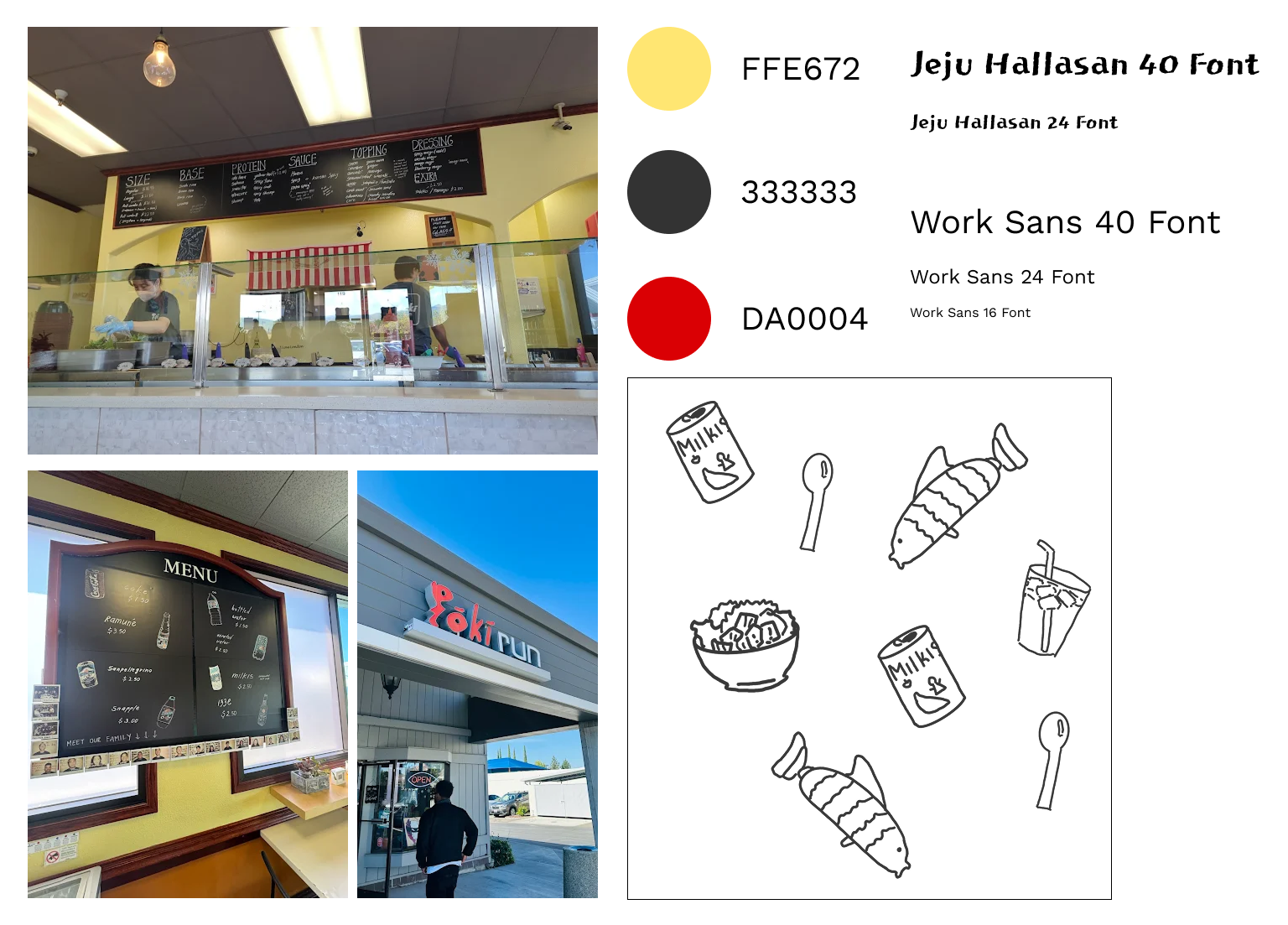
Starting this project from scratch was more difficult than I thought. My goal was to bring familiarity to the website with the actual store. After going to the store and finding that their store has a character of its own I decided on some inspirations to tackle.
I loved the color theming of the restaurant. I wanted to try and use the yellow and black and use the red for the accent color
They have a lot of hand drawn menu items and instructions in their store. I wanted to use the black and the font choice to reflect a bit of that feeling of chalkboard along with drawing some images like in their menu.
Design - Mood/Prototyping
High Fidelity Wireframe
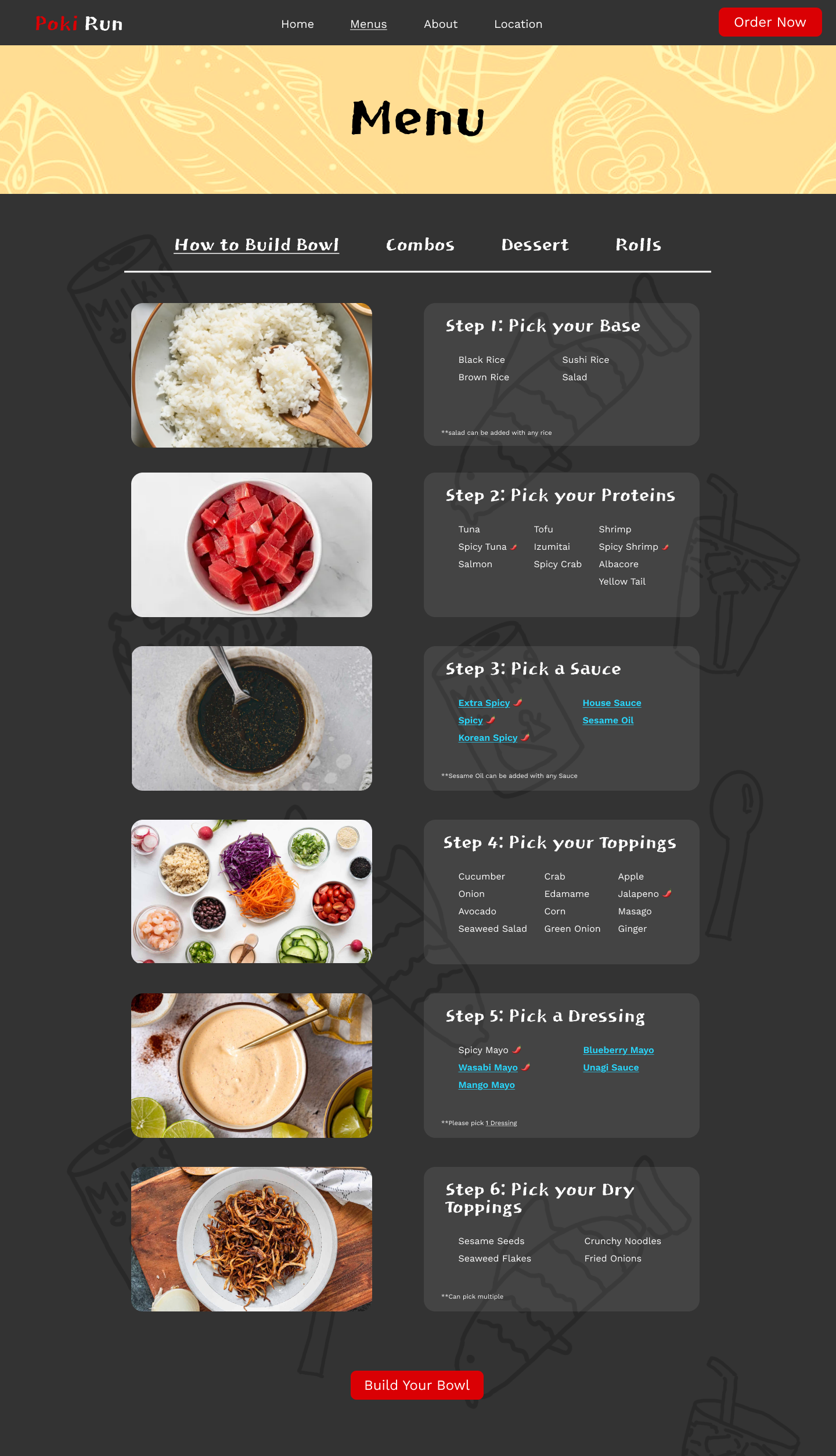
After testing the lower fidelity wireframes, I decided on some changes that were made into the high fidelity wireframes
I originally had the menu bigger, which caused users confusion, users did not realize they needed to scroll down for the menu. By changing the menu to be icon to be smaller and bringing up the physical menu, this shared to users to scroll and go down.
Added a backdrop to all of the steps for more clarity. Some users indicated visual issues with the background images.
Added physical links for the sauces and dressings for easier access to dropdowns for the sauces underneath the steps.
Added images on the left to show what foods were being talked about.
High Fidelity Prototype User Testing
I tested some of these initial ideas with 4 users who all participated in my low and mid fidelity testings. Although many of them already knew the design, a lot of meaninful input was given from them (from perspectives of users who frequently order online to 1 user who only orders online once every couple months) and decided to continue to work with the same users.
User commented about adding an indicator for spicy foods saying “I can’t handle that much spice, so having an indicator helps me to know (even if it is pretty obvious with the name)”
Added to add some background to the text for better visability. Although she says she can see it, maybe for others it might be a hard time.
For dropdowns, one user explained he wanted images for the sauces and dressings as well.
After hearing all the testings, I implemented them into the final design and created what is the prototype
High Fidelity Prototype:
Takeaways/Reflections
This project showed me the different perspective needed while tackling a business to consumer directly website. Many times I thought of an idea, which did not translate well because of the aspect of the customer not being aligned.
Through it all, I was able to express and be more creative being a redesign of a website. However, I knew needing to make it appealing to customers was the most important. To help my work flow, I had a note on my Figma of the aspects I needed to make sure I tackled, which helped tremendiously to make sure my focus/vision was clear.
